Website Performance for Advertisers
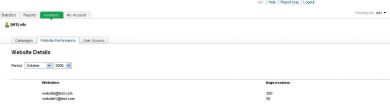
Website Performance for Advertisers shows an advertiser how many impressions each website carrying their ads has delivered, for a date they choose. Advertisers see which sites perform best and place banners there.
What it does
- Impression counts are listed for each website in the advertiser's network, so weak sites stand out.
- Month, date and year drop-downs select the period, which allows checks on a regular basis.
- Comparing sites over time helps the advertiser put banners on the site with the highest success rate.
- Status for all websites sits in one place, so there is no need to piece it together from separate reports.
How it fits your ad stack
The reporting is on the advertiser side inside Revive Adserver and counts impressions. Viewability is a different measure: the MRC standard for display asks for at least half the pixels in view for one continuous second, with a lower pixel threshold for large display ads.
Full feature details
The website performance for advertisers plugin for revive ad server allows the advertiser to monitor the progress of all the websites in which their ads are been published. The advertiser can find the count of impressions made on each website present in his network. The plugin will help the advertiser to figure out the best website to publish his ad banners. The plugin provides a drop down list box which has the month, date and year fields by selecting those fields the advertiser can able to find the performance of the website in the chosen date selected by him.
The advertiser can track the progress of the site in a periodic basis and able to publish his ads in the best site which has a highest success rate.
Benefits of this plugin
- The advertiser can able to find the best suitable website to publish his ads.
- The plugin will provide the status of all websites and helps to identify the count of impressions made on all the sites.
Frequently Asked Questions
Included with every plugin
- Installation and setup help. We help you install the plugin on your Revive Adserver and confirm that it is working.
- 3 weeks of free support from the day of delivery, covering installation, configuration and any bug in the plugin.
- Your Revive Adserver version. Choose your version in the Product Versions drop-down on this page.
- Licenses to fit your setup. Choose Single Domain, Multi Domain or Source Code in the License drop-down.
Need changes made for your setup? Custom work and consulting are available. Contact us with your requirements.
Common questions
Which Revive Adserver versions does this plugin support?
The supported versions are listed in the Product Versions drop-down on this page. If you run a version that is not listed, contact us before ordering.
What does the free support cover?
For 3 weeks from delivery we help with installation, configuration and any bug in the plugin. Custom development and problems caused by other plugins or your hosting are not part of the free support, but we can quote them separately.
Can you adapt the plugin to my setup?
Yes. Custom work is available. Tell us what you need and we will quote it.