Hide Past Inactive Campaigns
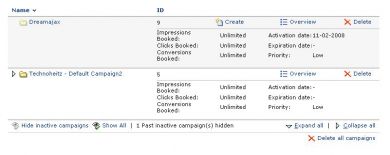
Hide Past Inactive Campaigns removes expired campaigns from the campaign overview page while keeping future campaigns visible. Advertisers see what is running now and what is coming.
What it does
- Only expired, past inactive campaigns are hidden, so the overview is less cluttered.
- Campaigns that will activate later stay in view, so advertisers can manage current and upcoming campaigns together.
How it fits your ad stack
The default hide inactive link in Revive Adserver hides future campaigns as well, and this plugin changes that behavior in the campaign overview page.
Full feature details
This mod allows to hide those campaigns which are expired, (past inactive campaigns) in campaign overview page.
This mod will not hide campaigns which will be activated in future.
For example, if Advertiser has a campaign set to active tomorrow, and now if the Advertiser clicks on hide inactive campaigns link, it will hide all inactive campaigns from view.
It means it will hide campaigns which will be activated in future also. (And this is what most advertisers don't want because he want to manage all current campaign and future campaigns)
So, this mod will help for such kind of Advertisers.
They could see all active campaigns and all future campaigns also, so that Advertiser will find it easy-to-manage active campaigns in their current view.
Frequently Asked Questions
Included with every plugin
- Installation and setup help. We help you install the plugin on your Revive Adserver and confirm that it is working.
- 3 weeks of free support from the day of delivery, covering installation, configuration and any bug in the plugin.
- Your Revive Adserver version. Choose your version in the Product Versions drop-down on this page.
- Licenses to fit your setup. Choose Single Domain, Multi Domain or Source Code in the License drop-down.
Need changes made for your setup? Custom work and consulting are available. Contact us with your requirements.
Common questions
Which Revive Adserver versions does this plugin support?
The supported versions are listed in the Product Versions drop-down on this page. If you run a version that is not listed, contact us before ordering.
What does the free support cover?
For 3 weeks from delivery we help with installation, configuration and any bug in the plugin. Custom development and problems caused by other plugins or your hosting are not part of the free support, but we can quote them separately.
Can you adapt the plugin to my setup?
Yes. Custom work is available. Tell us what you need and we will quote it.