Out-Stream Video Ads plugin for Revive Adserver

This plugin lets Revive Adserver deliver video ads inside standard display ad units and page content, outside an in-stream video player. Publishers and ad networks use it to bring video demand to article, feed and mobile web inventory.
What it does
- Video runs on inventory with no video player, in in-banner, in-article, slider and interstitial formats, which opens more placements to video budgets.
- Internal video creatives and external third-party VAST tags are both accepted, so existing video demand can be used.
- VAST video takes part in a single unified auction with the other video formats, so out-stream competes fairly with the rest of your video.
- Viewers get controls such as mute, skip and close, with an end card and click-through to the advertiser.
- Playback is defined per format, for example autoplay once the unit is sufficiently visible and pause when it leaves view; where a browser blocks autoplay a poster image is shown and the viewer clicks to play.
How it fits your ad stack
It covers desktop and mobile web delivery, and in-banner video follows standard IAB banner sizes with HTML5 creatives. Out-stream placement sits between display and in-stream. VAST 4.x is the current line, and the Better Ads Standards from the Coalition for Better Ads treat auto-playing video with sound as below consumer expectations, which is why muted playback matters here.
Full feature details
Out-stream video ads plugin for Revive Adserver deliver video ads outside of in-stream video content. Out-stream video ads leverage the existence of standard display ad units to deliver a video experience. For example, a site visitor may view an article on a news website and a muted, auto-play video ad may load in a standard display ad unit.
Out-stream video ads will not be the main focus of the page and will not be rendered in a prominent video player. They are displayed outside of a video player and are delivered in articles, social feeds, between levels of a game, etc. VAST video, both internal and external third-party VAST tags are supported and Out-stream video takes part in a single unified auction along with other video formats.
Supported Out-stream Video Ad formats
• Desktop & Mobile Web Ad format
Desktop & Mobile Web Support Ad format
• In-banner video
• In-article video
• Slider Video Ads
• Videos Ads
• Interstitial Video Ads
In-Banner Video

• Supports desktop and mobile web ad delivery.
• HTML5 video creatives triggered within a standard display banner ad on a webpage.
• Abides standard IAB banner sizes.
• Display banners are designed to run in-banner video campaigns.
• Videos will be displayed over the background image and the in-banner video as a display background image and video player.
• HTML5 creatives for in-banner video ads can be hosted directly in Display.
• The video will be played when the user clicks on the background image and the ad unit must be 50% visible to the user.
In-Article Video

• Supports desktop and mobile web ad delivery.
• Delivers display ads in the present module that can be handled with insight images.
• Ads with video-only creatives, which appear between paragraphs of editorial content, existing as a standalone branded message.
• In-article video out-stream format supports fixed display ad slots Desktop and Mobile web .
• When 50% of the ad unit is visible, the video automatically plays in a muted state and is automatically paused when out of view. An impression is counted on rendering the first frame of the video.
• Once the video is finished, the ad unit remains visible with an end card, which displays the last frame of the video and a "Learn more" button which clicks to the advertiser site.
• Some browsers do not allow autoplay video. In those instances, the poster image is shown and requires users to click to play the video
Slider Video Ads
• The Video Slider Ads delivers the video ads with maximum 30 seconds duration at the bottom right/left corner of the screen.
• Sliding behavior option (Right or Left) is available for advertiser to choose on banner creation.
• When a website is loaded the user can see a video ad sliding from the bottom right/left corner of the website and it can be placed on any pages of website.
• The video ad plays without sound and has option to unmute it; the users are also given option to pause/play the video.
• Close button is available on the top of the ad at right side, allowing the users to close the ad at any time.
• Ad will be paused if the user goes to another tab and plays again when the user returns to the page. Once the user closes the ad or if the entire video has been watched, the ad slides out from the bottom right of the screen and disappear.
• Video Slider will appear during the entire scroll of the user on the website.
Video Ads
• Responsive videos with close ad and skip ad option on desktop, tablets, and mobiles. This video shows up in-between a browsing session when the user is online.
• Videos delivered through the plugin are muted and the user can enable it and even can restart the ad from beginning. Once the ad play time is completed, the video will be removed from the screen. Destination URL is provided with each video and upon clicking it the user will be guided to the landing page of the destination URL.
• User have Play, Pause, Mute, Unmute, Fullscreen and Skip options. User can skip the ad by clicking the "Skip ad" button and after the skip time over. An advertiser can set Skip time as user can not skip the video till the skip time get over. Also offers a close button and the user is able to close the video ad.
• Maximum file size permitted by the plugin is 3MB and the duration of the ad can be 60 seconds. Moreover provides options to add other third party VAST Tags.
Interstitial video Ads
• Supports desktop, mobile web ad delivery.
• Typical full-screen ads that will take up the entire screen space of the Desktop & mobile web.
• The probability of a user clicking on the ad is higher in interstitial ads; also a close button is available on the top right corner of the ad and the user can return to by clicking it.
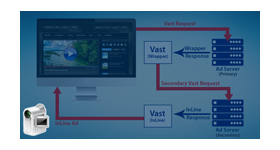
• Supports: VAST inline ads, wrapper ads, media support includes MIME type video/MP4
• Supported Video tracking Pixels: video start, first quartile, midpoint, third quartile, and video complete.
• Maximum video duration: 0-30 seconds
• Tracking pixels or destination URL can also be tracked.
Plugin Highlights
Increase brand awareness
Increase impression by In-page or native placement of the ads. Also, increase users for your brand.
Great value
Advertisers will be only charged only when someone views the video for two seconds or more because Out-stream ads are charged based on viewable cost-per-thousand-impressions (vCPM).
Easy to manage
The plugin enables you to create your campaign, enter targeting, select your video, add a logo with two lines of text, and you’re ready to go.
Frequently Asked Questions
Included with every plugin
- Installation and setup help. We help you install the plugin on your Revive Adserver and confirm that it is working.
- 3 weeks of free support from the day of delivery, covering installation, configuration and any bug in the plugin.
- Your Revive Adserver version. Choose your version in the Product Versions drop-down on this page.
- Licenses to fit your setup. Choose Single Domain, Multi Domain or Source Code in the License drop-down.
Need changes made for your setup? Custom work and consulting are available. Contact us with your requirements.
Common questions
Which Revive Adserver versions does this plugin support?
The supported versions are listed in the Product Versions drop-down on this page. If you run a version that is not listed, contact us before ordering.
What does the free support cover?
For 3 weeks from delivery we help with installation, configuration and any bug in the plugin. Custom development and problems caused by other plugins or your hosting are not part of the free support, but we can quote them separately.
Can you adapt the plugin to my setup?
Yes. Custom work is available. Tell us what you need and we will quote it.