Campaign Deactivation Notification
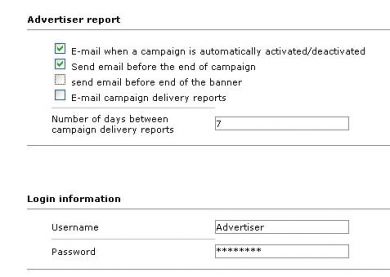
Campaign Deactivation Notification sends an email to the advertiser before a campaign or banner expires. Advertisers on Revive Adserver no longer find out only after their banner is removed.
What it does
- An email goes out before the campaign or banner expires, so the advertiser has time to react.
- The advertiser can plan the next banner or renew the same one in time.
- Advertisers do not need to log in to track expiry, because the status reaches them in their inbox.
The lead time before expiry, whether the admin or publisher is also told, and whether limit-based endings are covered along with date-based ones are not stated, so confirm those.
Full feature details
The advertiser can able to publish their banner in the website for the certain period and later when expiration takes place the banners will be removed from the site without prior notification.
So the advertiser need to keep track through his account login and this drawback can be rectified with the help of campaign deactivation notification plugin for revive ad server. The plugin will notify the advertiser beforehand through Email and they can make changes accordingly. The notification will be sent before the expiration of campaign or banner. So the advertiser can able to plan for his next banner or renewal of the same banner. The expiration notification will be sent to the advertiser through emails and with the help of it the advertiser can plan his next move.
Benefits of this plugin:
- The advertiser can able to find the status of his banners displayed in the publisher’s site.
- The plugin will send the prior notification to the advertiser before the banner or campaign expiration.
Frequently Asked Questions
Included with every plugin
- Installation and setup help. We help you install the plugin on your Revive Adserver and confirm that it is working.
- 3 weeks of free support from the day of delivery, covering installation, configuration and any bug in the plugin.
- Your Revive Adserver version. Choose your version in the Product Versions drop-down on this page.
- Licenses to fit your setup. Choose Single Domain, Multi Domain or Source Code in the License drop-down.
Need changes made for your setup? Custom work and consulting are available. Contact us with your requirements.
Common questions
Which Revive Adserver versions does this plugin support?
The supported versions are listed in the Product Versions drop-down on this page. If you run a version that is not listed, contact us before ordering.
What does the free support cover?
For 3 weeks from delivery we help with installation, configuration and any bug in the plugin. Custom development and problems caused by other plugins or your hosting are not part of the free support, but we can quote them separately.
Can you adapt the plugin to my setup?
Yes. Custom work is available. Tell us what you need and we will quote it.