
Video Ad format plugin for Revive
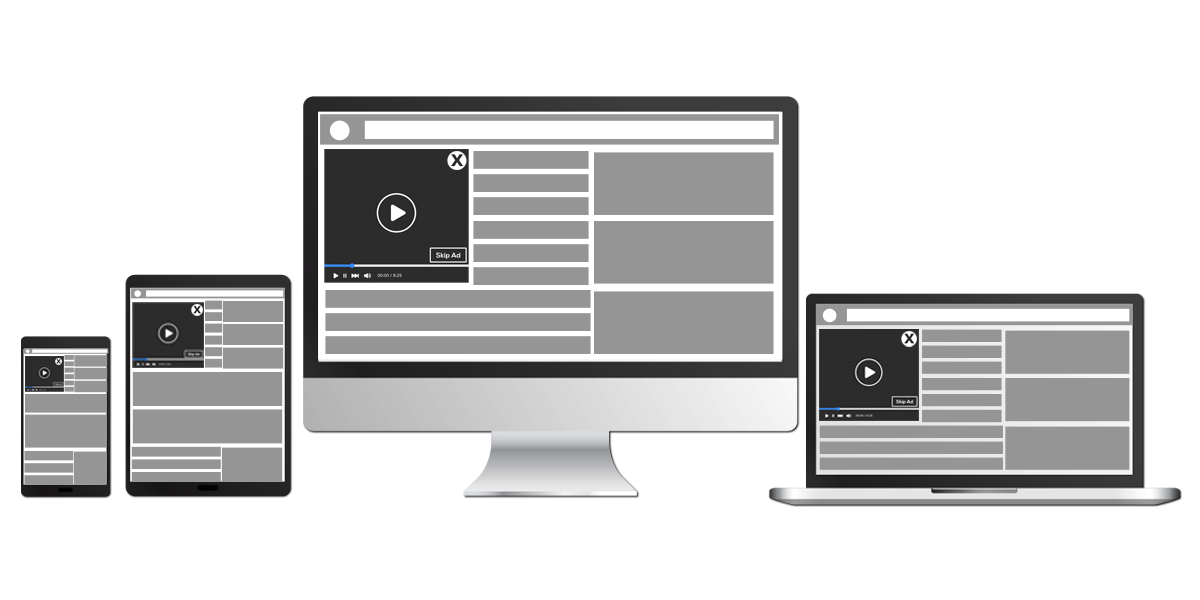
This plugin delivers video ads on desktop, tablets and mobiles that pop up in a natural break in a browsing session, without a separate player. Publishers and advertisers get a video placement with frequency control.
What it does
- Controls how often the video appears through frequency capping, so visitors are not shown it too often.
- Pops up in a natural break for browsing users, which the vendor says reduces the risk of frustrating them.
- Lets advertisers set the skip time, so viewers see the start of the creative before they can skip.
- Starts muted and gives viewers Play, Pause, Mute, Unmute, Fullscreen and Skip controls plus a close button.
- Accepts third party VAST tags as an optional source and lets the ad run for 60 seconds, so outside demand can fill the same placement.
How it fits your ad stack
Supported video formats are MP4, HLS and WEBM, and a destination URL is provided with each video for the landing page. In the IAB Tech Lab VAST standard, which tells a video player which ad to play, 4.x is the current line, and third-party tags added here are worth testing against it. The Open Measurement SDK lets third-party verification vendors measure viewability and verify ads in video and display, and muted start avoids the sound-on experiences flagged in the Better Ads Standards from the Coalition for Better Ads.
Full feature details
Video ad format plugin for revive adserver delivers enticing video creatives without the aid of any player on desktops, mobiles, and tablets. With close button and skip video options, creatives delivered by the plugin will be displayed only when there is an ad, meaning, the plugin delivers video creatives based on frequency capping and video creatives will pop up in-between user browsing session.
Plugin Highlights
• The plugin delivers responsive videos with close ad and skip ad option on desktop, tablets, and mobiles. This video shows up in-between a browsing session when the user is online.
• Advertisers with the plugin can make use of frequency capping for ad delivering time interval. Depending on it, when the user is on the site video will pop up with the display.
• Videos delivered through the plugin are muted and the user can enable it and even can restart the ad from beginning. Once the ad play time is completed, the video will be removed from the screen. Destination URL is provided with each video and upon clicking it the user will be guided to the landing page of the destination URL.
• The plugin provides the user to Play, Pause, Mute, Unmute, Fullscreen and Skip options. User can skip the ad by clicking the "Skip ad" button and after the skip time over. An advertiser can set Skip time as user can not skip the video till the skip time get over. Also, this plugin offers a close button and the user is able to close the video ad.
• The duration of the ad can be 60 seconds. Moreover, the plugin provides options to add other third party VAST Tags. The third part linking is optional.
Supported video format
•MP4 •HLS •WEBM
Also, formats developed in the future can be included to support video delivery.
Plugin Benefits
• Improved conversion rate
• This Ad placement looks like a natural break for browsing users and minimizes the risk of frustrating the users
• Rich Video experience
• Absence of skip ad option in the initial few seconds of the creative encourages the user to continue with the creative.
Frequently Asked Questions
Included with every plugin
- Installation and setup help. We help you install the plugin on your Revive Adserver and confirm that it is working.
- 3 weeks of free support from the day of delivery, covering installation, configuration and any bug in the plugin.
- Your Revive Adserver version. Choose your version in the Product Versions drop-down on this page.
- Licenses to fit your setup. Choose Single Domain, Multi Domain or Source Code in the License drop-down.
Need changes made for your setup? Custom work and consulting are available. Contact us with your requirements.
Common questions
Which Revive Adserver versions does this plugin support?
The supported versions are listed in the Product Versions drop-down on this page. If you run a version that is not listed, contact us before ordering.
What does the free support cover?
For 3 weeks from delivery we help with installation, configuration and any bug in the plugin. Custom development and problems caused by other plugins or your hosting are not part of the free support, but we can quote them separately.
Can you adapt the plugin to my setup?
Yes. Custom work is available. Tell us what you need and we will quote it.