Enable Direct Selection for Revive Adserver
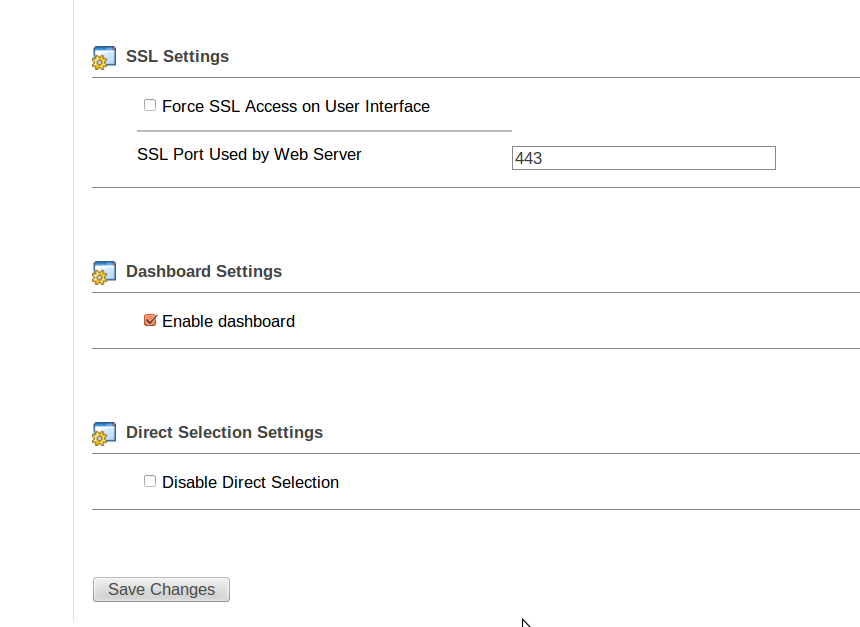
Enable Direct Selection generates a single invocation code that delivers an advertiser's ads across several zones and websites. It removes the need to build a separate code for every zone.
What it does
- One code covers the required zone specifications of one or more publishers, so the same ad can run on multiple websites and zones.
- Setup takes less time because there are no distinct invocation codes to generate and track.
- You supply the banner ID and campaign ID for each zone, which keeps the right creative tied to the right placement.
How it fits your ad stack
The code is built from zone specifications that already exist in Revive Adserver.
Full feature details
Enable direct selection plugin for revive ad server is used to reduce the complexity in delivering the advertisement in multiple publishers zones and websites. For example, if an advertiser has to publish the advertisement in different zones of one or more publishers, the advertiser has to generate a single invocation code for all required zones and can perform the process easily.
The plugin can generate the invocation code for the required zone specifications of the publisher and deliver the advertisements in all required websites. To deliver the ads in multiple zones, the advertiser has to provide respective banner id and campaign id of each zone.
Benefits of the plugin
- The advertiser can advertise the same advertisement in multiple websites and zones.
- By using this plugin, the users can avoid the complexity in generating multiple invocation code for distinct zones.
- The plugin is effective and less time consuming.
Frequently Asked Questions
Included with every plugin
- Installation and setup help. We help you install the plugin on your Revive Adserver and confirm that it is working.
- 3 weeks of free support from the day of delivery, covering installation, configuration and any bug in the plugin.
- Your Revive Adserver version. Choose your version in the Product Versions drop-down on this page.
- Licenses to fit your setup. Choose Single Domain, Multi Domain or Source Code in the License drop-down.
Need changes made for your setup? Custom work and consulting are available. Contact us with your requirements.
Common questions
Which Revive Adserver versions does this plugin support?
The supported versions are listed in the Product Versions drop-down on this page. If you run a version that is not listed, contact us before ordering.
What does the free support cover?
For 3 weeks from delivery we help with installation, configuration and any bug in the plugin. Custom development and problems caused by other plugins or your hosting are not part of the free support, but we can quote them separately.
Can you adapt the plugin to my setup?
Yes. Custom work is available. Tell us what you need and we will quote it.