Google Statistics Maps - Country Based
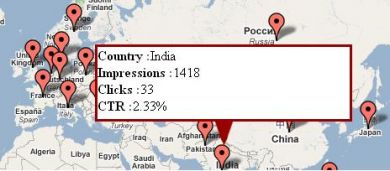
Google Statistics Maps (Country Based) marks the location of end users who viewed or clicked an advertiser's banners on a Google map. Advertisers can see which locations bring the most clicks or impressions.
What it does
- A map pointer shows where the customer is, with the count of impressions, clicks and CTR percentage.
- Advertisers can monitor the locations with the highest click or impression counts and spot high-value marketplaces.
- It can find the location of a customer who clicked the banners, and reports are by advertiser banners.
The product name appears as Aaps in the description and should read Maps. The text says exact location, so ask whether the data is country level or finer, how location is derived, and whether the Google map needs an API key. Teams that handle location data usually review GDPR and CCPA/CPRA obligations.
Full feature details
The Google Statistics Aaps – Country Based plugin for revive ad server is used to show the exact location of end users who have clicked or viewed the banners of the advertiser. The plugin allows the advertiser to monitor the particular location which has a maximum click or impression count.
The pointer in the Google maps shows the right location of the customer and by identifying the location the advertiser can able to identify the high-value marketplace. The plugin will display the right location of the customer along with the count of impressions, clicks, and CTR percentage.
Benefits of this plugin
- The plugin helps the advertiser to target the location which has maximum click count.
- The advertiser can able to find the location of any customer who clicked the banners.
Frequently Asked Questions
Included with every plugin
- Installation and setup help. We help you install the plugin on your Revive Adserver and confirm that it is working.
- 3 weeks of free support from the day of delivery, covering installation, configuration and any bug in the plugin.
- Your Revive Adserver version. Choose your version in the Product Versions drop-down on this page.
- Licenses to fit your setup. Choose Single Domain, Multi Domain or Source Code in the License drop-down.
Need changes made for your setup? Custom work and consulting are available. Contact us with your requirements.
Common questions
Which Revive Adserver versions does this plugin support?
The supported versions are listed in the Product Versions drop-down on this page. If you run a version that is not listed, contact us before ordering.
What does the free support cover?
For 3 weeks from delivery we help with installation, configuration and any bug in the plugin. Custom development and problems caused by other plugins or your hosting are not part of the free support, but we can quote them separately.
Can you adapt the plugin to my setup?
Yes. Custom work is available. Tell us what you need and we will quote it.