DMP (Data management platform) for Revive Adserver
This plugin adds a data management platform to Revive Adserver: it collects site visitor data with a tracking pixel, accepts imported third-party audience files, and lets you segment and export audiences for targeting. Publishers, advertisers, ad networks and exchanges use it to put audience data to work.
What it does
- Generates a tracking pixel per publisher site that records country, city, IP, device OS, browser and visited page against a unique user ID, giving you first-party audience data you own.
- Imports third-party audience data in JSON, CSV or text format, so outside data can enrich what the pixel collects.
- Filters the audience list by country and device type and searches by device name, OS, OS version and browser, which makes it practical to find the group you want.
- Builds segments and exports them in CSV, so audiences can be used for targeting on other platforms.
- Shows top regions on a map plus device statistics on the dashboard, for a quick view of who the audience is.
How it fits your ad stack
The pixel is placed on the site, and exported segments move to other platforms as CSV files. The plugin collects IP addresses and visitor behaviour, which privacy laws may cover: GDPR and CCPA/CPRA are the laws most often referenced by ad tech consent tools, and support for consent mechanisms is not described, so check before collecting data. For segment structure, IAB Tech Lab Audience Taxonomy v1.1 covers audience segments.
Full feature details
Data Management Platform (DMP) for Revive Adserver, an ideal solution to collect, organize and activate first-, second- and third-party audience data from any source, including online, offline, mobile, and beyond. DMP is a vital part in data-driven marketing and it allows businesses to reach customer with the perfect creative based on the unique insights obtained from the DMP. A DMP collects and organizes data from first-, second- and third-party data sources, and makes it available to other platforms like DSPs, SSPs, and ad exchanges to be used for delivering targeted advertising, personalization, content customization and much more.
What does a DMP do?
A DMP can collect unstructured audience data from sources such as desktop, mobile web, web analytic tools, CRM, point of sale, social, online video, and offline. This first-party data; data owned by the organisation and is collected directly from customers based on specific behaviors such as clicks, downloads, video uploads or video completions using the DMP Tracking pixel. Users extended details like interests sports, football, parenting, museums and travel or demographic information can be collected by integrating with Third Party DMP’s. Basically the DMP gets hold of the unstructured data and delivers a perfectly segmented, analysised, and updated data on a constant rate. The data can range from first-party to third-party data. With data make optimal use of marketing campaigns to achieve the best results.
Highlights
Track Audience
The DMP tracking pixel generated in the plugin is placed on the site. The pixel is used for obtaining invaluable first party data; first-party data that is the data from own customers and collected directly from the user.
Import Third Party
Upload the audience details collected from Third party DMP’s into the platform by JSON, CSV or Text file formats
Audience Details
Audience data tracked and obtained form the site will get listed and uploaded for targeting the user. Audience list can be filtered by country & device type can also searched by device name, OS, OS version & browser.
Segmentation
Segmentation means to divide the users into parts, or segments, which are definable, accessible, actionable and profitable to have potential growth. Subdivision of a user into segments with similar characteristics such as location, interest, behaviours, device details, social behaviours.
Dashboard
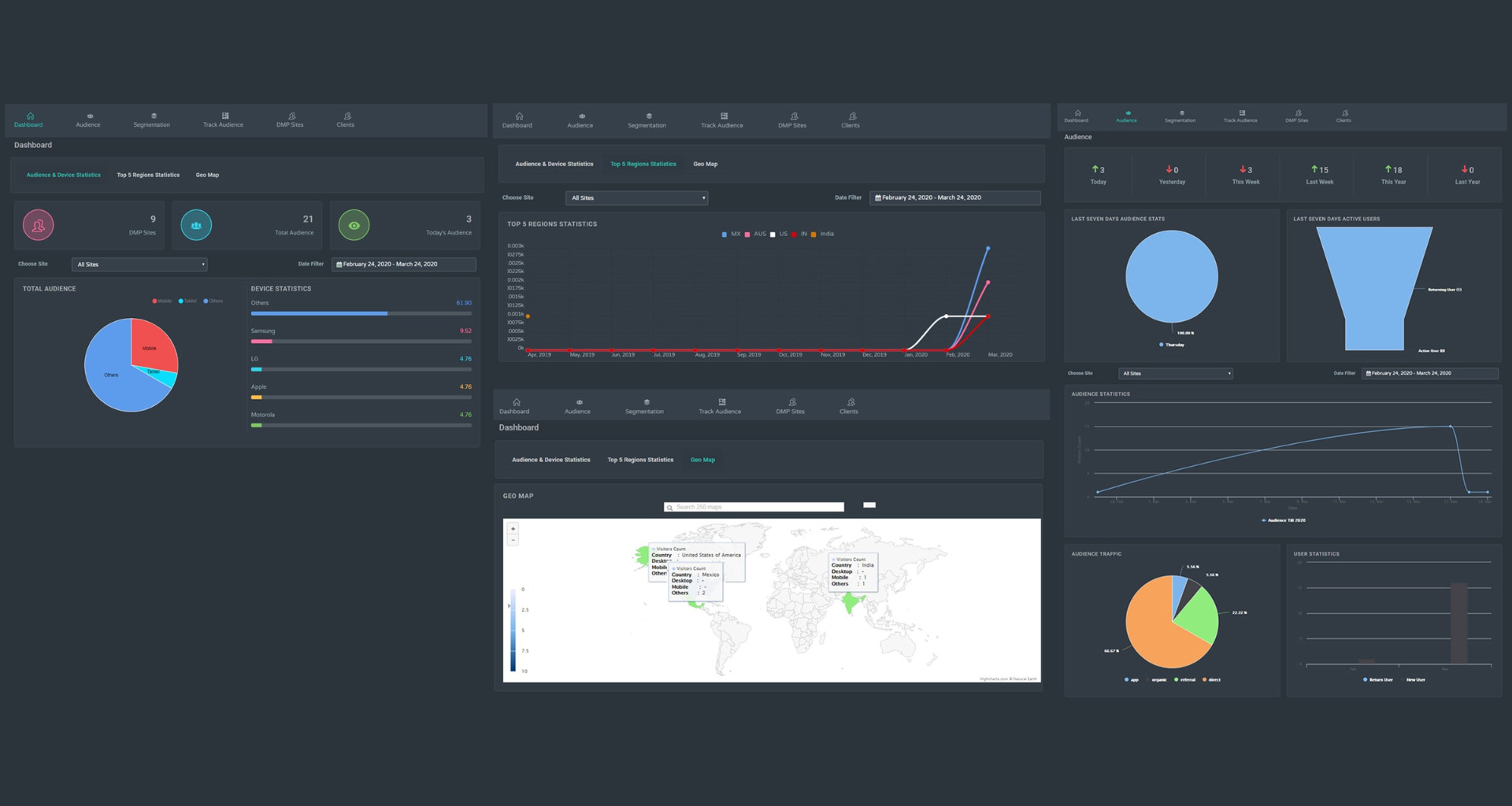
Dashboard showcases the top 5 regions of audience report for specific dates based on the sites and visitors counts gets displayed in Geo Map. In additional the User device statistics details also displayed
Scalability
Keep all data, without any storage limits, forever! which helps publisher to collect their first-party data and aggregate various dimensions of report for publishers to obtain the highest revenue for their ad inventory and website content optimization for attracting more user to their website.
DMP Operation
Adding Clients and Sites
Advertiser, Adexchanges, Adnetworks, Publishers, can register into the platform. Publishers can add the site and generate pixel tracking url for the respective sites. Advertiser, Adexchanges, Adnetworks can segment user data and import into their platform for user targeting in campaigns.
Publisher Site Visitors Tracking
Tracking pixel placed on the site by the publisher will start tracking users visiting the site. Information like Country, City, IP, Device OS, Browser and visited page can be tracked and stored in the platform as a new user by assigning a unique user id for every new user. Likewise users next visit, upcoming visit and behaviours will be tracked and stored.
Enhancing Audience
By Integrating or Importing the Third Party DMP data, audience data can be enhanced or new user will be added into the platform.
Segmenting and Audience Building
Once data is organized in the platform, the information can be used to build audiences profile for specific marketing campaigns by segmenting. Can segment the audience by data points Age, Conversion, engagement, Email, Height, Income, IP Address, Social Media etc., by applying multiple conditions for a period of time. Can update the segments often.
Export Audience
Segmented audience data can be exported from DMP platform in a CSV format and it can be imported into the Adservers, Adexchanges, Adnetworks platforms and targeted in the campaign audience targeting. For example, a retailer may want to target one particular ad to females between the age group of 18-34 while another may be focused on men who frequently buy shoes online. Regardless of who they are trying to reach, marketers, publishers and advertisers rely on audience segmenting to power their data-driven campaigns and reach the right consumers at the right time.
Ad Delivery
When a new user visits the website containing a creative, the browser sends an ad request to the ad exchange. The ad exchange will then redirect the ad request to the DMP and with the assistance of pixel tracker and unique user ID in the parameter the best suited ad for the visiting user will be delivered. The DMP reads its own cookie, or creates a new cookie, and then saves the user ID passed from the ad exchange along with its own user ID in the cookie-matching table.
If the sync is bidirectional, DMP makes the redirect back to the ad exchange by passing its own ID in the URL parameter. The ad exchange receives this request, reads its own cookie, and stores the DMP ID along with its own ID in the cookie-matching table.
Now, both the ad exchange and DMP have each other’s user IDs in each other’s databases. Adserver retrieve current user dmp cookie id from cookie matching table. if the cookie id match with targeted segment will deliver the ads.
Statistics
Audience Statistics - It displays the last seven days audience stats, active users, return users, and Visitors count by daywise
User Statistics - Detailed audience traffic (Direct, Organic, Referral)
Frequently Asked Questions
Included with every plugin
- Installation and setup help. We help you install the plugin on your Revive Adserver and confirm that it is working.
- 3 weeks of free support from the day of delivery, covering installation, configuration and any bug in the plugin.
- Your Revive Adserver version. Choose your version in the Product Versions drop-down on this page.
- Licenses to fit your setup. Choose Single Domain, Multi Domain or Source Code in the License drop-down.
Need changes made for your setup? Custom work and consulting are available. Contact us with your requirements.
Common questions
Which Revive Adserver versions does this plugin support?
The supported versions are listed in the Product Versions drop-down on this page. If you run a version that is not listed, contact us before ordering.
What does the free support cover?
For 3 weeks from delivery we help with installation, configuration and any bug in the plugin. Custom development and problems caused by other plugins or your hosting are not part of the free support, but we can quote them separately.
Can you adapt the plugin to my setup?
Yes. Custom work is available. Tell us what you need and we will quote it.