Email to All Advertisers
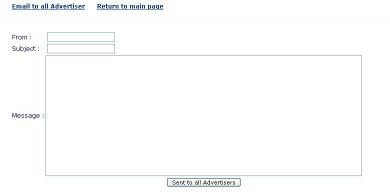
Email to All Advertisers lets the admin send the same message to every advertiser in the ad server. In standard behavior the admin can email only one advertiser at a time.
What it does
- A 'send to all advertisers' option shows text boxes for subject and message, then sends the message to everyone at once.
- One announcement replaces many separate emails, which saves the admin's time.
- Regular group communication improves contact between the admin and the advertisers.
- The description calls it simple and easy to install.
How it fits your ad stack
It is an admin panel option in Revive Adserver and covers advertisers only. The mail setup it uses, HTML or attachment support, unsubscribe handling and send limits are not described, so check those before a large send.
Full feature details
The email to all advertisers plugin for revive ad server is used to send emails to all advertisers present in the ad network. The plugin can be used by admin to convey the same message to all advertisers in the ad server but in the existing system the admin can able to send the email to the particular advertiser at a time.
The plugin has a special option called send to all advertisers, by clicking that option a two text boxes for subject and message will be displayed.By writing the message in the text box, the admin can send the message to all advertisers present in the openx or revive ad server.
Benefits of this plugin
- The admin can save his time by sending the message to all advertisers in the ad network.
- The plugin improves communication between admin and advertiser.
- The plugin is very simple and can be installed very easily.
Frequently Asked Questions
Included with every plugin
- Installation and setup help. We help you install the plugin on your Revive Adserver and confirm that it is working.
- 3 weeks of free support from the day of delivery, covering installation, configuration and any bug in the plugin.
- Your Revive Adserver version. Choose your version in the Product Versions drop-down on this page.
- Licenses to fit your setup. Choose Single Domain, Multi Domain or Source Code in the License drop-down.
Need changes made for your setup? Custom work and consulting are available. Contact us with your requirements.
Common questions
Which Revive Adserver versions does this plugin support?
The supported versions are listed in the Product Versions drop-down on this page. If you run a version that is not listed, contact us before ordering.
What does the free support cover?
For 3 weeks from delivery we help with installation, configuration and any bug in the plugin. Custom development and problems caused by other plugins or your hosting are not part of the free support, but we can quote them separately.
Can you adapt the plugin to my setup?
Yes. Custom work is available. Tell us what you need and we will quote it.