Pagepeel Ad Format
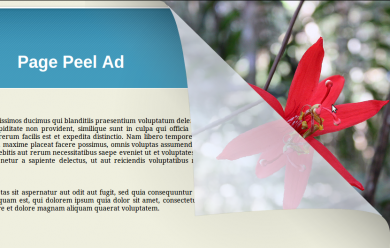
Pagepeel Ad Format shows an ad behind the publisher's web page, which the visitor reveals by peeling back the left or right corner with the mouse. Advertisers get an interactive attention unit, and publishers get a format that sits in the page corner.
What it does
- The ad sits in a corner and opens only when the visitor hovers there, so it stays out of the way until wanted.
- The page returns to its original position when the visitor moves away.
- The aim is more clicks and impressions, with earnings for both advertiser and publisher.
How it fits your ad stack
The peel can be set to the left or right corner, and custom and IAB standard sizes are supported. The corner ad is 100x100 for a 400x400 mouse hover area. Corner peels trigger on hover, so test on touch devices. Sellers of this format often check viewability against the MRC display standard of at least 50% of pixels in view for 1 continuous second.
Full feature details
The page peel ad format plugin for revive ad server will display the ads behind the publisher’s web page; the customer can view the ads by peeling the web page from the right or left corner of the screen.
The peeling option can be placed either in left or right corner of the website and when the mouse hovers over the particular area, the page will start peeling to reveal the ads. The user can interact with the ads and they can easily peel the web page.
The plugin supports both custom and IAB standard sizes and the ads will have size format of 100X100 for 400X400 mouse hover. The page will start peeling when a mouse hovers over the peeling area and when a user stops it, the page will return back to its original position.
Benefits of this plugin
- These ads will attract the wide range of customers and it increase clicks and impressions.
- The ads will earn more revenue to both advertiser and publisher.
Frequently Asked Questions
Included with every plugin
- Installation and setup help. We help you install the plugin on your Revive Adserver and confirm that it is working.
- 3 weeks of free support from the day of delivery, covering installation, configuration and any bug in the plugin.
- Your Revive Adserver version. Choose your version in the Product Versions drop-down on this page.
- Licenses to fit your setup. Choose Single Domain, Multi Domain or Source Code in the License drop-down.
Need changes made for your setup? Custom work and consulting are available. Contact us with your requirements.
Common questions
Which Revive Adserver versions does this plugin support?
The supported versions are listed in the Product Versions drop-down on this page. If you run a version that is not listed, contact us before ordering.
What does the free support cover?
For 3 weeks from delivery we help with installation, configuration and any bug in the plugin. Custom development and problems caused by other plugins or your hosting are not part of the free support, but we can quote them separately.
Can you adapt the plugin to my setup?
Yes. Custom work is available. Tell us what you need and we will quote it.