Banner Creation Access for Advertisers
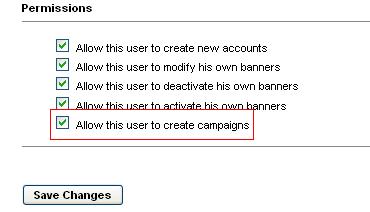
Banner Creation Access for Advertisers lets the admin choose which advertisers may upload and create ad banners themselves. Ad network admins stop being the bottleneck for every creative.
What it does
- Selected advertisers create the banners they need from their own login section, so creative changes happen faster.
- The admin controls who gets the privilege, which keeps banner creation limited to chosen accounts.
How it fits your ad stack
The plugin adds a section in Revive Adserver where the admin picks advertisers and grants banner creation access.
Full feature details
Banner creation access for advertisers plugin for revive adserver allows the admin to provide access to the advertiser for creating the ad banners on the server. The plugin allows the user to select the desired advertisers for enabling the access for banner creation.
Once the privilege has been given to the advertiser, the user can create the ad banners in their login section. The plugin provides a section to choose the advertiser and for providing access to the selected users. It benefits the users by permitting the advertiser to access the banner creation and by saving the time of the admin.
Benefits of the plugin
- The admin can provide access to selected advertisers for banner creation.
- The advertiser can create the required banners.
Frequently Asked Questions
Included with every plugin
- Installation and setup help. We help you install the plugin on your Revive Adserver and confirm that it is working.
- 3 weeks of free support from the day of delivery, covering installation, configuration and any bug in the plugin.
- Your Revive Adserver version. Choose your version in the Product Versions drop-down on this page.
- Licenses to fit your setup. Choose Single Domain, Multi Domain or Source Code in the License drop-down.
Need changes made for your setup? Custom work and consulting are available. Contact us with your requirements.
Common questions
Which Revive Adserver versions does this plugin support?
The supported versions are listed in the Product Versions drop-down on this page. If you run a version that is not listed, contact us before ordering.
What does the free support cover?
For 3 weeks from delivery we help with installation, configuration and any bug in the plugin. Custom development and problems caused by other plugins or your hosting are not part of the free support, but we can quote them separately.
Can you adapt the plugin to my setup?
Yes. Custom work is available. Tell us what you need and we will quote it.