GameBox Ads
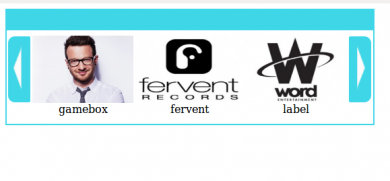
GameBox Ads displays ads in a slide bar on the publisher's website that visitors can scroll vertically and horizontally. Publishers and ad networks on Revive Adserver get an interactive ad unit in place of a static banner.
What it does
- Visitors scroll through the ads in the slide bar, and previous and next pager options come with the slider, so one unit carries several banners.
- The publisher can limit the number of banners shown in the slider, which keeps the unit short.
- A color picker changes the slider color, so it can match the publisher's site design.
- Both standard IAB ad formats and custom formats are supported.
How it fits your ad stack
The publisher places the unit with an invocation code supplied by the plugin. File types listed are gif, png and jpg. Descriptions differ on whether this is a slider on a publisher site or ads inside online games, so confirm which one you are getting. Interactive units are commonly reviewed against the Better Ads Standards.
Full feature details
The game box ads plugin for revive ad server is used to display user interactive ads in the publisher’s website. The ads are displayed in a slide bar where the user can scroll it both vertically and horizontally, the previous and next pager options are also available along with the slider.
The plugin provides a number of customizing options to the user that allows them to limit the number of banners displayed in the slider. The plugin provides color picker option that allows the user to change the color of the slider displayed in the publisher’s site.
Features of this plugin
- The plugin supports both standard IAB ad formats and custom formats.
- The file types supported by this plugin are .gif, .png, .jpg and .swf.
- The plugin provides an invocation code to the publisher to display the game box ads.
Frequently Asked Questions
Included with every plugin
- Installation and setup help. We help you install the plugin on your Revive Adserver and confirm that it is working.
- 3 weeks of free support from the day of delivery, covering installation, configuration and any bug in the plugin.
- Your Revive Adserver version. Choose your version in the Product Versions drop-down on this page.
- Licenses to fit your setup. Choose Single Domain, Multi Domain or Source Code in the License drop-down.
Need changes made for your setup? Custom work and consulting are available. Contact us with your requirements.
Common questions
Which Revive Adserver versions does this plugin support?
The supported versions are listed in the Product Versions drop-down on this page. If you run a version that is not listed, contact us before ordering.
What does the free support cover?
For 3 weeks from delivery we help with installation, configuration and any bug in the plugin. Custom development and problems caused by other plugins or your hosting are not part of the free support, but we can quote them separately.
Can you adapt the plugin to my setup?
Yes. Custom work is available. Tell us what you need and we will quote it.