Post variables when successfully conversion is done for advertiser
This plugin lets an advertiser post custom variables in a URL when a conversion takes place. Advertisers on Revive Adserver get conversion data from their audience.
What it does
- A URL text box in the campaign section is enabled by the add option, and the advertiser enters the variables there.
- Variables are posted when a conversion occurs, so data from the audience arrives during conversion.
- The advertiser can post variables whenever needed and count successful conversions with them.
How it fits your ad stack
- The ad server needs CURL support. Which variables are available and what exactly is posted, to which URL and by which method, are not described, so confirm those. The text refers to the advertiser's zone, while advertisers do not own zones, so check what is meant.
- Passing conversion data to external URLs is usually reviewed against consent and privacy obligations. The IAB Europe TCF v2.3 launched in April 2025, and GDPR and CCPA/CPRA are the laws most often referenced by consent tools.
Full feature details
The Post variables when successfully conversion is done for advertiser and ad server allow the advertiser to post customized variables in the URL when any conversion takes place.
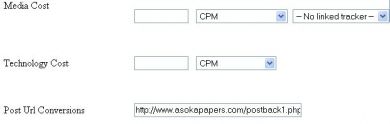
The plugin provides a URL text box in campaign section, in the text box the advertiser can add their desired variables when the conversion occurs. The text box will be enabled when the advertiser clicks add option in the panel.
The advertiser can able to find the number of successful conversions occurred in the advertiser’s zone by posting the variable in the URL. The plugin can be installed in the ad server if it has CURL protocol support.
Benefits of this plugin
- The plugin helps to collect the data from the audience during conversion.
- The advertiser can post the variable whenever he requires and can keep track on the successful conversions occur in the advertiser’s zone.
Frequently Asked Questions
Included with every plugin
- Installation and setup help. We help you install the plugin on your Revive Adserver and confirm that it is working.
- 3 weeks of free support from the day of delivery, covering installation, configuration and any bug in the plugin.
- Your Revive Adserver version. Choose your version in the Product Versions drop-down on this page.
- Licenses to fit your setup. Choose Single Domain, Multi Domain or Source Code in the License drop-down.
Need changes made for your setup? Custom work and consulting are available. Contact us with your requirements.
Common questions
Which Revive Adserver versions does this plugin support?
The supported versions are listed in the Product Versions drop-down on this page. If you run a version that is not listed, contact us before ordering.
What does the free support cover?
For 3 weeks from delivery we help with installation, configuration and any bug in the plugin. Custom development and problems caused by other plugins or your hosting are not part of the free support, but we can quote them separately.
Can you adapt the plugin to my setup?
Yes. Custom work is available. Tell us what you need and we will quote it.