Mobile Ad mediation Plugin
This plugin lets mobile app owners mediate Revive Adserver ads and third-party network ads through adapters for Android and iOS. Requests move down a priority list until an ad is found, with the internal ad as the last fallback, so apps show something wherever possible.
What it does
- Calls networks in priority order and falls back to an internal ad, which raises fill by trying several sources before showing nothing.
- Relays banner, interstitial, rewarded video and native formats through mediation, so one setup covers the common app formats.
- Reports date range, network, requests, responses, impressions, clicks, CTR and fill rate per mediation network, so network performance can inform the next priority order.
- Lets publishers sign up as Mobile App users, create zones or ad units, attach mediation networks and download the Android or iOS SDK, so app teams set up their own placements.
How it fits your ad stack
The admin configures adapter parameters, and only users created as Mobile App users can reach the mobile app features. Waterfall mediation calls networks one after another, whereas header bidding runs bidders in parallel, and Prebid Server runs auctions server-side. For in-app inventory, buyers check app-ads.txt, which lets app publishers declare who is authorised to sell it.
Full feature details
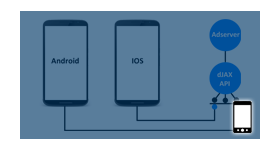
Ad mediation is the management of multiple ad networks through a single SDK to help publishers increase CPMs, fill rates, and efficiency. Mobile Ad Mediation for Revive Adserver is a plugin that enables users to integrate the mediation adaptors for Android or iOS applications.
Ad mediation provides a feature that lets you serve ads to your apps from multiple sources such as Revive internal ads and third party network ads via adapter. Mediation helps maximize the fill rate and increase your monetization by sending ad requests to multiple networks to ensure you find the best available network to serve ads.
What is waterfall mediation?
Waterfall mediation process begins with the first priority network on the list, and if they have an ad to serve, the ad is returned to the app. If they don’t have an ad, the request is sent to the next priority network on the list, and the process repeats until an ad is found or the end of the list. In case of no ads from all partners in the waterfall, then the internal ad will be delivered.
Waterfall mediation was once the most popular method has since become the preferred method of mobile ad mediation.
Ad format support
Here are some of the common ad formats that can be relayed through mediation
- Banner ads
- Interstitial ads
- Rewarded video ads
- Native ads (AdMob)
Admin configure and setup parameters for all adapters is by default configured. Publisher can select the adapters Publisher/Mobile app owners to integrate the Android and iOS SDK with their mobile application.
In signup there is an option to select as Mobile App/Website user. Only users created as Mobile app would be able to access Mobile app features. They can create zone/ad units and associate mediation networks with zone and targeting metrics. They can download the SDK for Android or iOS Apps.
Supporting Ad Network Adaptors
AdMob | Ironsource | ChartBoost | Adcolony | Unity Ads
Mediation Statistics
Here are a list of stats that can be obtained from the mediation. The results of which can be analyzed and strategized in future campaigns.
• Date Range
• Mediation network Name
• No of Ad Request
• No of Ad Response
• Total Impressions
• Total Clicks
• CTR
• Fill Rate
Frequently Asked Questions
Included with every plugin
- Installation and setup help. We help you install the plugin on your Revive Adserver and confirm that it is working.
- 3 weeks of free support from the day of delivery, covering installation, configuration and any bug in the plugin.
- Your Revive Adserver version. Choose your version in the Product Versions drop-down on this page.
- Licenses to fit your setup. Choose Single Domain, Multi Domain or Source Code in the License drop-down.
Need changes made for your setup? Custom work and consulting are available. Contact us with your requirements.
Common questions
Which Revive Adserver versions does this plugin support?
The supported versions are listed in the Product Versions drop-down on this page. If you run a version that is not listed, contact us before ordering.
What does the free support cover?
For 3 weeks from delivery we help with installation, configuration and any bug in the plugin. Custom development and problems caused by other plugins or your hosting are not part of the free support, but we can quote them separately.
Can you adapt the plugin to my setup?
Yes. Custom work is available. Tell us what you need and we will quote it.