Hide website names for Advertiser
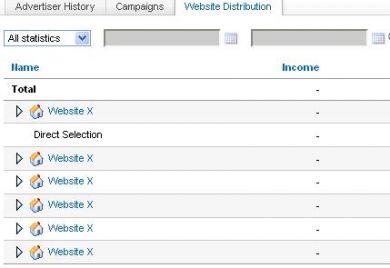
This module lets the administrator hide publisher website names from chosen advertisers in Revive Adserver. Advertisers still see their results, but not the sites where their ads ran.
What it does
- The site name is removed from the advertiser's statistics report section, so advertisers cannot see where the ads were delivered.
- Hiding a particular website name from an advertiser is described as good security for the publisher, protecting the publisher relationship.
- The administrator applies it per advertiser, so only the accounts you choose are affected.
- Operation is described as user friendly, and the module installs easily in the ad server.
How it fits your ad stack
The change applies to what advertisers see in their statistics reports in Revive Adserver; admin views are not described as changing.
Full feature details
“Now admin can easily hide the website name for any advertisers”
The hide website names for advertiser Module for revive ad server allows the administrator to hide website names for any advertiser. The plug-in for revive ad server can hide the particular website name where the Ads are delivered from the advertiser so that he cannot view the site name in any possible ways.
The Module can be installed easily in the ad server and it provides user friendly operations. The mod works perfectly in revive and openx ad server and offer privacy benefits to both admin and publisher.
Advantages of this Plugin
- The website name will be hidden in the statistics report section of advertiser.
- Hiding particular website names from an advertiser will provide good security to the publisher.
Frequently Asked Questions
Included with every plugin
- Installation and setup help. We help you install the plugin on your Revive Adserver and confirm that it is working.
- 3 weeks of free support from the day of delivery, covering installation, configuration and any bug in the plugin.
- Your Revive Adserver version. Choose your version in the Product Versions drop-down on this page.
- Licenses to fit your setup. Choose Single Domain, Multi Domain or Source Code in the License drop-down.
Need changes made for your setup? Custom work and consulting are available. Contact us with your requirements.
Common questions
Which Revive Adserver versions does this plugin support?
The supported versions are listed in the Product Versions drop-down on this page. If you run a version that is not listed, contact us before ordering.
What does the free support cover?
For 3 weeks from delivery we help with installation, configuration and any bug in the plugin. Custom development and problems caused by other plugins or your hosting are not part of the free support, but we can quote them separately.
Can you adapt the plugin to my setup?
Yes. Custom work is available. Tell us what you need and we will quote it.