Basic Anti Fraud Click System
Basic Anti Fraud Click System stops excess clicks from being logged in Revive Adserver. Advertisers set a click limit per user and a reset timer, and clicks above the limit never reach the statistics.
What it does
- Clicks from individuals, bots or scripts beyond the limit are cut off at the logging step, which the plugin treats as the first step of any anti click fraud effort.
- The advertiser decides the limit and the reset time, so the control fits each campaign.
- With fewer fraudulent clicks logged, the click numbers an advertiser sees sit closer to real interest.
How it fits your ad stack
One example describes capping clicks from one user within two minutes, with anything above the cap not logged to Revive Adserver. It is a basic-level control that limits click logging rather than analysing behaviour. The MRC separates General Invalid Traffic (GIVT) from Sophisticated Invalid Traffic (SIVT), and a per-user cap is the kind of simple step teams apply to the general category; sophisticated traffic usually needs more than a rate limit.
Full feature details
Click Fraud occurs when Individuals, Automated Bot or a Script generate false clicks to the Ad, without having any interest on buying/subscribing it.
"Find and Eliminate Fraudulent Clicks!"
“Basic Anti Fraud Click System” this plugin protects your Ad from click fraud and to eliminate fraud clicks logging at the basic level.
The Functionality of the plugin will be eliminating all Fraud Clicks Logging, where this will be the first step and goal of any Anti Click Fraud.
How this plugin works?
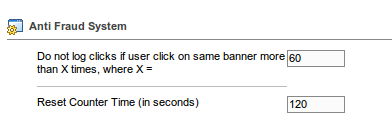
If an Advertiser does not wants to log fraud clicks generated to the Ads, he can set the number of click that can be counted for a session from a user where we have the timer to get the reset time.
For example, if an Advertiser doesn't want to log more than 60 clicks to the Ad from a user in 120 seconds (i.e. 2 min), Clicks that are received above the limit will not be logged to the Revive Adserver.
Frequently Asked Questions
Included with every plugin
- Installation and setup help. We help you install the plugin on your Revive Adserver and confirm that it is working.
- 3 weeks of free support from the day of delivery, covering installation, configuration and any bug in the plugin.
- Your Revive Adserver version. Choose your version in the Product Versions drop-down on this page.
- Licenses to fit your setup. Choose Single Domain, Multi Domain or Source Code in the License drop-down.
Need changes made for your setup? Custom work and consulting are available. Contact us with your requirements.
Common questions
Which Revive Adserver versions does this plugin support?
The supported versions are listed in the Product Versions drop-down on this page. If you run a version that is not listed, contact us before ordering.
What does the free support cover?
For 3 weeks from delivery we help with installation, configuration and any bug in the plugin. Custom development and problems caused by other plugins or your hosting are not part of the free support, but we can quote them separately.
Can you adapt the plugin to my setup?
Yes. Custom work is available. Tell us what you need and we will quote it.