Track Guest Visits
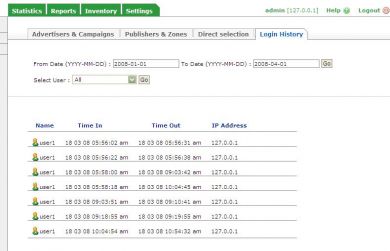
Track Guest Visits gives Revive Adserver admins a table of everyone who has visited the network, new or returning, with the time each one spent. It sits in a separate section of the What's going on panel, so the record is one click away from daily admin work.
What it does
- A table of guests who visited the network replaces manual tracking, so admins can see who is arriving without keeping their own notes.
- Login history for every existing and new user is recorded, which gives a complete trail when you need to check who was in the network and when.
- Time spent by each user is shown, so admins can tell a brief visit from a long one.
- Wide search options let the admin pull up all users or a single user, and the table view can be changed to suit how the admin prefers to work.
How it fits your ad stack
The section is added to the What's going on panel in the Revive Adserver admin interface and keeps its own table of guest records. Teams that store visit records usually weigh them against consent and privacy rules such as GDPR and CCPA/CPRA, so check how you keep and use the data for your audience. The description does not say whether consent or retention controls are included.
Full feature details
“Track your new and existing visitors and find how long they spent in the network”
Every ad server network holds plenty of new and existing visitors but tracking those users is a tedious task for admin. For that purpose track your new visitors plugin for revive ad server was introduced, this mod will allow the admin to find the members who are visiting the network.
The mod will add a separate section in what’s going on panel; this section will maintain a unique table that holds the records of all guests who had visited the network. If admin desires he can change the view of the table as per his requirement.
Advantages of this Plugin
- The mod will provide complete login history of every existing and new user of the network.
- The admin can find the time spent by each user present in the network.
- The table has wide range search options that allow the admin to track all or single user.
Frequently Asked Questions
Included with every plugin
- Installation and setup help. We help you install the plugin on your Revive Adserver and confirm that it is working.
- 3 weeks of free support from the day of delivery, covering installation, configuration and any bug in the plugin.
- Your Revive Adserver version. Choose your version in the Product Versions drop-down on this page.
- Licenses to fit your setup. Choose Single Domain, Multi Domain or Source Code in the License drop-down.
Need changes made for your setup? Custom work and consulting are available. Contact us with your requirements.
Common questions
Which Revive Adserver versions does this plugin support?
The supported versions are listed in the Product Versions drop-down on this page. If you run a version that is not listed, contact us before ordering.
What does the free support cover?
For 3 weeks from delivery we help with installation, configuration and any bug in the plugin. Custom development and problems caused by other plugins or your hosting are not part of the free support, but we can quote them separately.
Can you adapt the plugin to my setup?
Yes. Custom work is available. Tell us what you need and we will quote it.