Clean Statistics for Particular Period
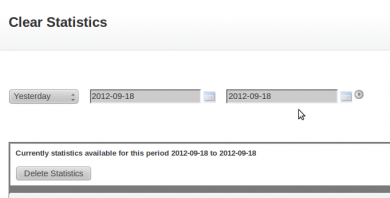
The Clean Statistics for Particular Period plugin deletes statistics records for a period chosen by start and end date. Ad network admins on Revive Adserver can clear old data without deleting from the database by hand.
What it does
- The admin gives a start date and an end date, and only the records for that period are removed.
- Cleaning old data keeps the database from growing unchecked as statistics accumulate every day.
- The description contrasts it with manual database deletion, which risks removing more data than intended.
Which tables are cleaned is not stated, so confirm that, and take a database backup before the first run.
Full feature details
The clean statistics for particular period plugin for revive ad server is used to remove old records present in the database. The users of openx or revive ad server will save bulk of data everyday and it will overrun the database in future, so cleaning is required for the ad network.
The cleaning or old data removal can be effectively done by this plugin, the deletion process will takes place when the user provides proper start and end date. Thus, the data loss will not occur in the cleaning process. The manual deletion of database will create huge data loss for the users of ad network but with the help of this plugin the data loss can be avoided.
Benefits of this plugin
- The user can remove unwanted data from the database with the help of this plugin.
- The plugin performs faster and cleans the database in an effective way.
Frequently Asked Questions
Included with every plugin
- Installation and setup help. We help you install the plugin on your Revive Adserver and confirm that it is working.
- 3 weeks of free support from the day of delivery, covering installation, configuration and any bug in the plugin.
- Your Revive Adserver version. Choose your version in the Product Versions drop-down on this page.
- Licenses to fit your setup. Choose Single Domain, Multi Domain or Source Code in the License drop-down.
Need changes made for your setup? Custom work and consulting are available. Contact us with your requirements.
Common questions
Which Revive Adserver versions does this plugin support?
The supported versions are listed in the Product Versions drop-down on this page. If you run a version that is not listed, contact us before ordering.
What does the free support cover?
For 3 weeks from delivery we help with installation, configuration and any bug in the plugin. Custom development and problems caused by other plugins or your hosting are not part of the free support, but we can quote them separately.
Can you adapt the plugin to my setup?
Yes. Custom work is available. Tell us what you need and we will quote it.