Layer Image
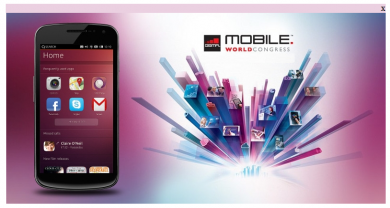
The Layer Image plugin shows an advertiser banner in a centered pop-up while the publisher page loads. Publishers on Revive Adserver get a simple placement with instant visibility.
What it does
- The pop-up appears at the center of the screen, so the banner gets noticed straight away.
- A close button lets the visitor dismiss it once the ad has been seen, and the site underneath is not affected.
- The advertiser supplies the banner and the plugin takes care of the display; listed formats are jpg, png and gif.
Pop-up placements are the kind of experience the Coalition for Better Ads covers in its Better Ads Standards, so review the setup against them before launch, and ask whether the pop-up repeats on every page load.
Full feature details
The layer image plugin for revive ad server is used to display the ads in popup window while the publisher site gets loaded.
This plugin will display the ads in the centre of the screen for instant impression. The plugin provides a user-friendly popup window with enabled close button; the customer can click the close button once the ads are viewed. The Popup window will not affect the publisher’s site in any manner and the end user can close or unclose it as desired.
The advertiser has to provide the banner of his ads and the mod will take care of the banner for the required end result. The plugin supports banner file formats like .jpg, .png, .swf and .gif.
Benefits of this plugin
- Simple and Easy to use
- The plugin is very beneficial for both the advertiser and the publisher.
Frequently Asked Questions
Included with every plugin
- Installation and setup help. We help you install the plugin on your Revive Adserver and confirm that it is working.
- 3 weeks of free support from the day of delivery, covering installation, configuration and any bug in the plugin.
- Your Revive Adserver version. Choose your version in the Product Versions drop-down on this page.
- Licenses to fit your setup. Choose Single Domain, Multi Domain or Source Code in the License drop-down.
Need changes made for your setup? Custom work and consulting are available. Contact us with your requirements.
Common questions
Which Revive Adserver versions does this plugin support?
The supported versions are listed in the Product Versions drop-down on this page. If you run a version that is not listed, contact us before ordering.
What does the free support cover?
For 3 weeks from delivery we help with installation, configuration and any bug in the plugin. Custom development and problems caused by other plugins or your hosting are not part of the free support, but we can quote them separately.
Can you adapt the plugin to my setup?
Yes. Custom work is available. Tell us what you need and we will quote it.