Notification Ad Plugin for Revive Adserver
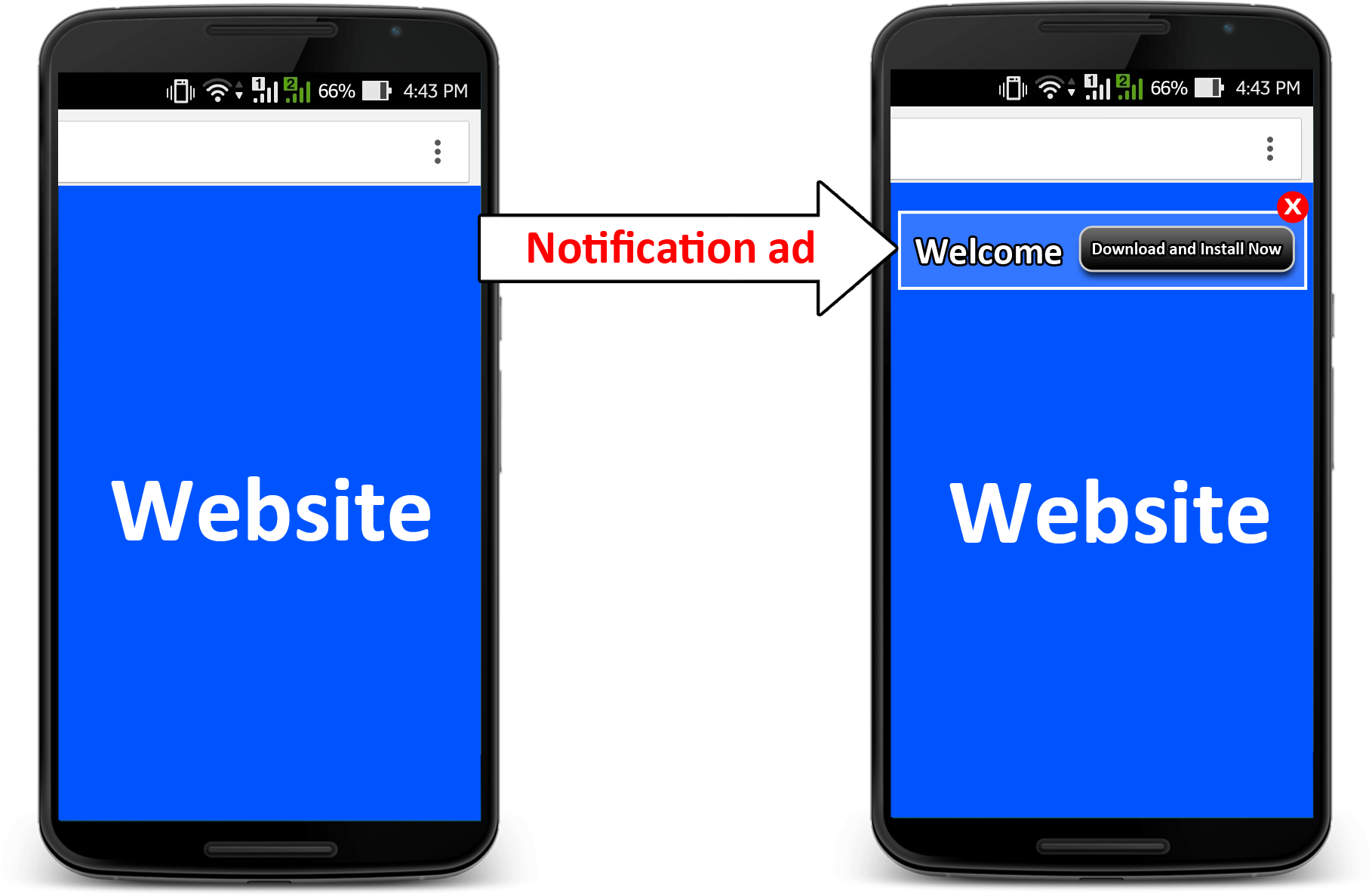
The Notification Ad plugin delivers a creative that looks like a notification, with a title and an HTML body, at the top of a publisher's page on mobile. It is a compact format that stays out of the main content.
What it does
- The message sits in a highly visible spot at the top of the page without blocking the content, which keeps the publisher's visitor experience intact.
- Clicking takes the visitor to the advertiser's site, and a close button lets everyone else dismiss the ad and carry on reading.
- The plugin adapts how the ad is drawn to different mobile devices and screen resolutions.
- Impressions and clicks are reported in Revive Adserver alongside other formats.
How it fits your ad stack
Notification creatives are delivered when a user visits the publisher's site on a mobile phone. Formats that overlay a page are judged by their effect on the visitor, and the Coalition for Better Ads Better Ads Standards are a common reference, so a dismissible, non-blocking design is worth checking against them.
Full feature details
The ‘Notification ad plugin’ for Revive Adserver displays creative resembles a notification on mobile devices. A mobile app has high probability of getting lost in the sea of applications installed on a device. By regularly sending notifications via push-enabled mobile apps, advertiser can actually encourage the app users to ‘come back’ to the app and use it more often. Notification ads appear as an alert at the top part of the website with a specific message in it. These notifications creative contain a title and a body (HTML).
The plugin delivers notification creative when a user visits a publisher’s site on his mobile phone. When the user interacts with the ad and clicks on it, they will be redirected to the advertiser’s site.
There is also a close button, which when pressed closes the ad and user continues on the publisher site.
The plugin renders notification ads differently on different mobile devices and screen resolutions.
Benefits
- Does not hinder the user experience on the publisher site
- Higher rate of ad visibility as the ad is placed at the top
- Produces a higher Click Through Rate (CTR) which in turn benefits both the advertiser and publisher
- Engaging Users, User Control, Insight into Customer Behaviour, Ease of Use, Complementary Communication.
Frequently Asked Questions
Included with every plugin
- Installation and setup help. We help you install the plugin on your Revive Adserver and confirm that it is working.
- 3 weeks of free support from the day of delivery, covering installation, configuration and any bug in the plugin.
- Your Revive Adserver version. Choose your version in the Product Versions drop-down on this page.
- Licenses to fit your setup. Choose Single Domain, Multi Domain or Source Code in the License drop-down.
Need changes made for your setup? Custom work and consulting are available. Contact us with your requirements.
Common questions
Which Revive Adserver versions does this plugin support?
The supported versions are listed in the Product Versions drop-down on this page. If you run a version that is not listed, contact us before ordering.
What does the free support cover?
For 3 weeks from delivery we help with installation, configuration and any bug in the plugin. Custom development and problems caused by other plugins or your hosting are not part of the free support, but we can quote them separately.
Can you adapt the plugin to my setup?
Yes. Custom work is available. Tell us what you need and we will quote it.