
Campaign Rotation By Calendar Week
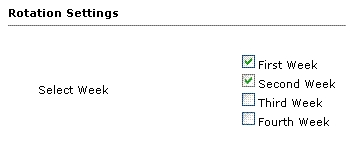
Campaign Rotation by Calendar Week shares one zone between several advertisers by giving each of them one week in turn. Ad networks can run different advertisers in the same zone without clashes.
What it does
- The admin sets start and stop dates for each month and allocates the zone to four advertisers within that period, so a month can be planned ahead.
- Each advertiser gets one week of display, and when it ends the next advertiser's ads take over, which gives every advertiser a turn.
- Equal priority for all users means no advertiser is favored by default.
How it fits your ad stack
It controls which advertiser's ads fill a zone in Revive Adserver, which helps when a zone is selected by several advertisers and the admin cannot display all of them at once.
Full feature details
The admin of revive ad server will manage many advertisers in their network and the admin can display the ads of the advertiser based on their requirement. If a particular zone is selected by several advertisers then admin cannot display all their ads in the same zone. For that purpose campaign rotation by calendar week plugin for revive ad server has been introduced. With the help of this plugin, the admin can display the ads of the single advertiser for a week.
The plugin will provide start and stop date option for every month within the start and stop date the admin can allocate the zone for four advertisers. Each advertiser will get a chance to display the ads for one week and when their date has been expired the ads of next advertiser will be displayed in the zone.
Benefits of this plugin
- The admin can pre-schedule his campaign for a month to advertise the banners.
- Every advertiser will get a chance to display the ads in publisher’s site.
- The plugin provides equal priority for all the users and help them to display the ads faster.
Frequently Asked Questions
Included with every plugin
- Installation and setup help. We help you install the plugin on your Revive Adserver and confirm that it is working.
- 3 weeks of free support from the day of delivery, covering installation, configuration and any bug in the plugin.
- Your Revive Adserver version. Choose your version in the Product Versions drop-down on this page.
- Licenses to fit your setup. Choose Single Domain, Multi Domain or Source Code in the License drop-down.
Need changes made for your setup? Custom work and consulting are available. Contact us with your requirements.
Common questions
Which Revive Adserver versions does this plugin support?
The supported versions are listed in the Product Versions drop-down on this page. If you run a version that is not listed, contact us before ordering.
What does the free support cover?
For 3 weeks from delivery we help with installation, configuration and any bug in the plugin. Custom development and problems caused by other plugins or your hosting are not part of the free support, but we can quote them separately.
Can you adapt the plugin to my setup?
Yes. Custom work is available. Tell us what you need and we will quote it.