
Display Ads Based on Location Temperature
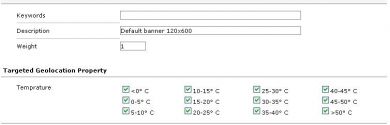
Display Ads Based on Location Temperature shows a banner according to the current temperature of a particular city or country. Advertisers on Revive Adserver can match ads to local weather.
What it does
- The advertiser picks a temperature option, and the plugin finds the location with that temperature and delivers the banner, so the message fits the conditions on the ground.
- A temperature and a city can be chosen together to reach the intended audience.
- The plugin lists the available temperatures for countries around the world, which makes selection simple.
How it fits your ad stack
It works as a targeting layer for a particular city or country. The weather data source, any API key, the refresh interval, how visitor location is detected and the temperature unit are not described, so ask for those. Contextual targeting often uses category lists such as IAB Tech Lab Content Taxonomy v3.0, and temperature is a different signal. Teams that use location data usually review GDPR and CCPA/CPRA obligations.
Full feature details
Display ads based on location temperature plugin for revive ad server is used to display the ad banner according to the current temperature of a particular city or a country.
The plugin provides all required temperature options and the user has to choose the temperatures in which the banner wants to display. Once the options are selected by the user, the plugin will find the location with chosen temperature and deliver the banner accordingly.
This plugin will be beneficial to the advertiser for delivering the ads according to the temperature of the particular area. The advertiser can choose the temperature of a targeted city and display the banner to the aimed audience.
Benefits of the plugin
- The plugin lists all the available temperatures of world countries.
- The advertiser can choose the desired temperature for publishing the ads.
Frequently Asked Questions
Included with every plugin
- Installation and setup help. We help you install the plugin on your Revive Adserver and confirm that it is working.
- 3 weeks of free support from the day of delivery, covering installation, configuration and any bug in the plugin.
- Your Revive Adserver version. Choose your version in the Product Versions drop-down on this page.
- Licenses to fit your setup. Choose Single Domain, Multi Domain or Source Code in the License drop-down.
Need changes made for your setup? Custom work and consulting are available. Contact us with your requirements.
Common questions
Which Revive Adserver versions does this plugin support?
The supported versions are listed in the Product Versions drop-down on this page. If you run a version that is not listed, contact us before ordering.
What does the free support cover?
For 3 weeks from delivery we help with installation, configuration and any bug in the plugin. Custom development and problems caused by other plugins or your hosting are not part of the free support, but we can quote them separately.
Can you adapt the plugin to my setup?
Yes. Custom work is available. Tell us what you need and we will quote it.