Mobile Ads SDK for iPhone/Android Apps
Mobile Ads SDK for iPhone/Android Apps delivers Revive Adserver ads inside Android and iOS apps. App publishers monetize with campaigns managed in Revive Adserver, and ad teams run image, text, HTML, HTML5 and several video formats from one SDK.
What it does
- Campaigns stay in Revive Adserver and reach apps on both platforms through the SDK, so ad ops keeps one place to manage them.
- Image, text, HTML and HTML5 creatives can be delivered in apps.
- Video formats are rewarded, interstitial, native and pause ad video (VAST overlay), which covers common in-app video placements.
- iOS uses an Xcode library with a .a file extension, and Android uses libraries with a .aar file extension.
How it fits your ad stack
The SDK integrates with Revive Adserver. In-app advertising has its own standards: MRAID v3.0 is IAB Tech Lab's interface for rich-media ads in mobile apps, app-ads.txt lets app publishers declare who is authorized to sell their in-app inventory, and the Open Measurement SDK lets third-party vendors measure viewability and verify ads in apps. VAST 4.x describes video ads. Only a VAST overlay for pause ads is named, so confirm support for the others.
Full feature details
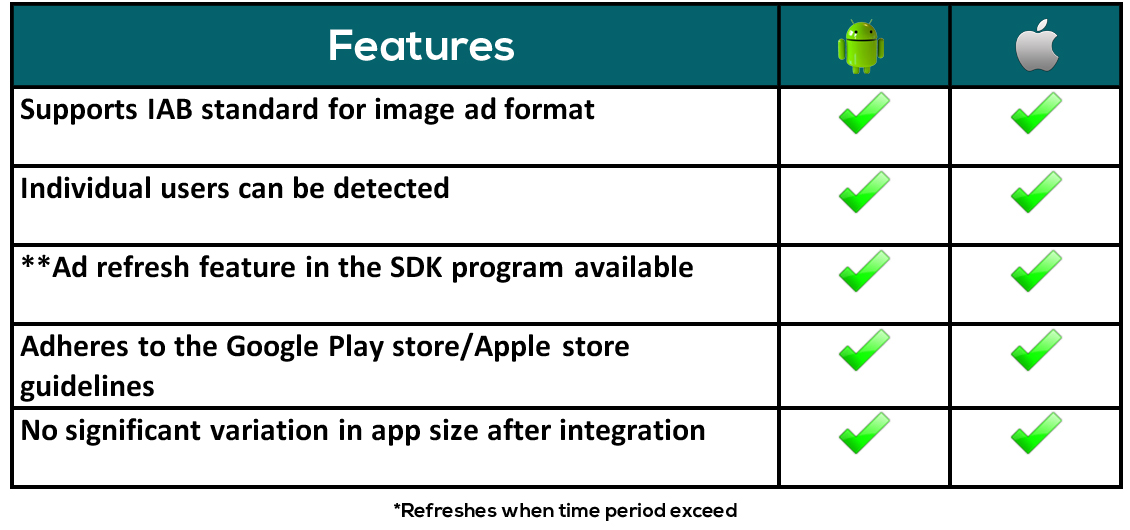
A futuristic plugin to deliver enhancing creatives for Android and iOS applications, Mobile ads SDK plugin for Android/iOS is designed to deliver engaging ads that can influence audience using both Android and iOS platforms in mobile devices. Deliver the best creatives on both platforms irrespective of the device. Simple and easy integration with the revive adserver is guaranteed by the plugin. Xcode library with .a file extension and eclipse and android studio libraries with .aar file extension is used for delivering creatives in iOS and Android respectively.
Plugin SDK features
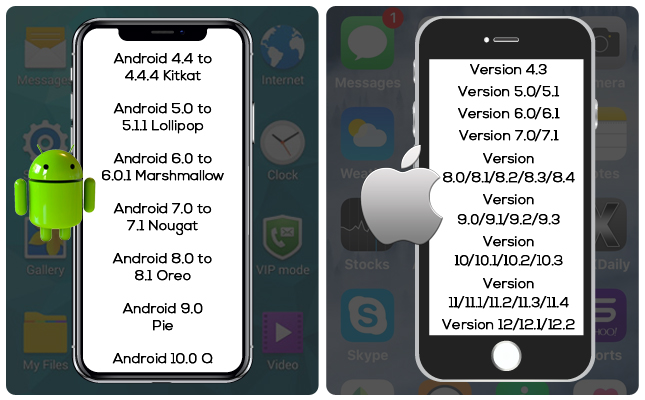
Supported OS versions for iOS and Android
Supported ad formats
Designed with futuristic ideas the plugin provides options to handle the ever-increasing popularity of mobile campaigns. These are the ad formats that can be delivered inside mobile apps.
•Image creative
•Text creative
•HTML
•HTML5
Supported Video ad formats
•Rewarded Video Ads •Interstitial Video Ads •Native Video Ads •Pause Ad Video (VAST Overlay)
Supported iOS devices
•iPhone – iPhone SE, iPhone X, iPhone XS, iPhone XS Max, iPhone XR, iPhone 5s, iPhone 6, iPhone 6 Plus, iPhone 6s, iPhone 6s Plus, iPhone 7, iPhone 7 Plus, iPhone 8, iPhone 8 Plus, iPhone 11, iPhone 11 Pro, iPhone 11 Pro Max, iPhone 12 mini, iPhone 12, iPhone 12 Pro, iPhone 12 Pro Max, iPhone 13 mini, iPhone 13, iPhone 13 Pro, iPhone 13 Pro Max, iPhone 14, iPhone 14 Plus, iPhone 14 Pro, iPhone 14 Pro Max, iPhone 15, iPhone 15 Plus, iPhone 15 Pro, iPhone 15 Pro Max, iPhone 16, iPhone 16 Plus, iPhone 16 Pro, iPhone 16 Pro Max, iPhone 16e, iPhone 17, iPhone 17 Pro, iPhone 17 Pro Max, iPhone Air
•iPad Mini – iPad mini 4, iPad mini (5th generation), iPad mini (6th generation), iPad mini (A17 Pro)
•iPad – iPad (5th generation), iPad (6th generation), iPad (7th generation), iPad (8th generation), iPad (9th generation), iPad (10th generation), iPad (A16)
•iPad Air – iPad Air 2, iPad Air (3rd generation), iPad Air (4th generation), iPad Air (5th generation), iPad Air 11-inch (M2), iPad Air 11-inch (M3), iPad Air 13-inch (M2), iPad Air 13-inch (M3)
•iPad Pro – iPad Pro 9.7-inch, iPad Pro 10.5-inch, iPad Pro 11-inch (1st generation), iPad Pro 11-inch (2nd generation), iPad Pro 11-inch (3rd generation), iPad Pro 11-inch (4th generation), iPad Pro 11-inch (M4), iPad Pro 11-inch (M5), iPad Pro – 12.9-inch, iPad Pro 12.9-inch (1st generation), iPad Pro 12.9-inch (2nd generation), iPad Pro 12.9-inch (3rd generation), iPad Pro 12.9-inch (4th generation), iPad Pro 12.9-inch (5th generation), iPad Pro 12.9-inch (6th generation), iPad Pro 13-inch (M4), iPad Pro 13-inch (M5)
Mobile Tracking Features
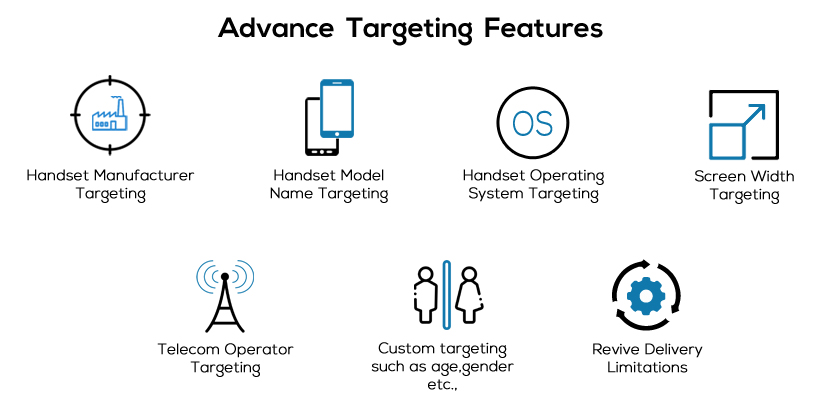
Enhanced targeting features allows you to deliver ads based on user interest and the probability of conversion is amplified with the advanced targeting features. Targeting is done based on the following criteria
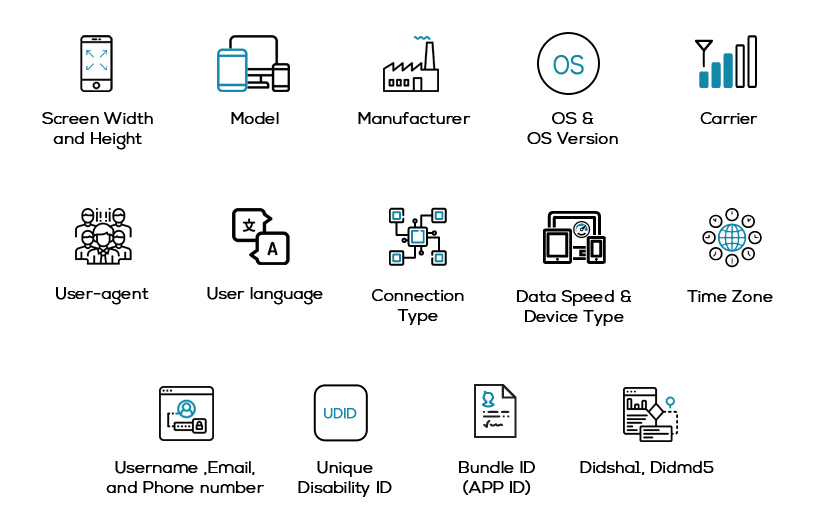
Features for mobile Targeting
Enhanced targeting features allows you to deliver ads based on user interest and the probability of conversion is amplified with the advanced targeting features. Targeting is done based on the following criteria,
Plugin Benefits
Frequently Asked Questions
Included with every plugin
- Installation and setup help. We help you install the plugin on your Revive Adserver and confirm that it is working.
- 3 weeks of free support from the day of delivery, covering installation, configuration and any bug in the plugin.
- Your Revive Adserver version. Choose your version in the Product Versions drop-down on this page.
- Licenses to fit your setup. Choose Single Domain, Multi Domain or Source Code in the License drop-down.
Need changes made for your setup? Custom work and consulting are available. Contact us with your requirements.
Common questions
Which Revive Adserver versions does this plugin support?
The supported versions are listed in the Product Versions drop-down on this page. If you run a version that is not listed, contact us before ordering.
What does the free support cover?
For 3 weeks from delivery we help with installation, configuration and any bug in the plugin. Custom development and problems caused by other plugins or your hosting are not part of the free support, but we can quote them separately.
Can you adapt the plugin to my setup?
Yes. Custom work is available. Tell us what you need and we will quote it.