
















































































































































































































AdOps Copilot Plugin for Revive Adserver
AdOps Copilot is an AI-powered assistant for Revive Adserver and AdExchange that lets advertising and AdOps teams ask questions in plain English, analyze campaign and live performance data, explore database information, investigate anomalies, and obtain clear, source-backed insights from a single conversational interface.
Your Revive Adserver serves the ads. AdOps Copilot tells you why the numbers changed.
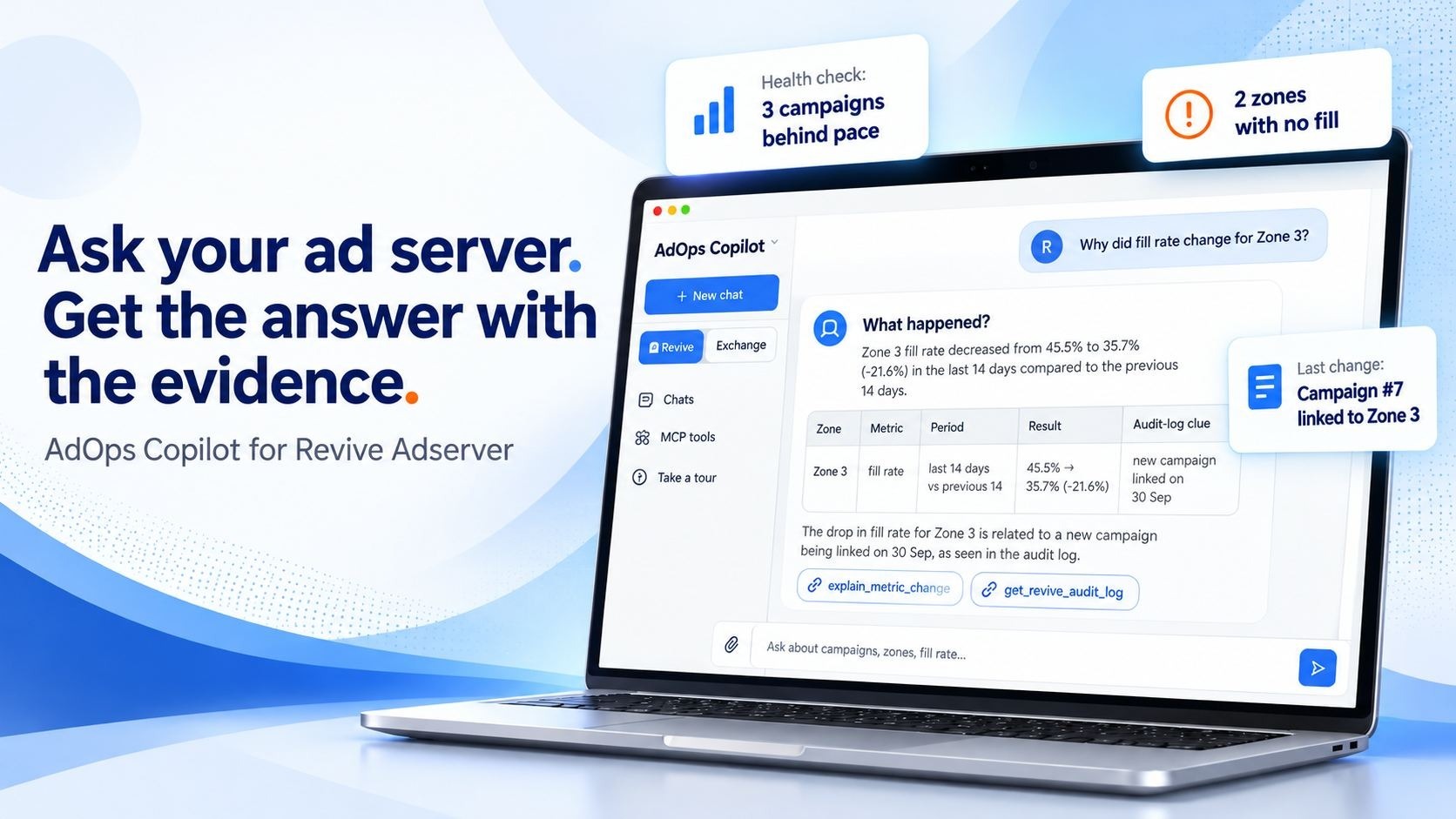
Revive Adserver is great at delivering ads, but it has never been good at explaining itself. When fill rate drops, a campaign under-delivers or revenue dips, someone has to click through statistics screens, export CSVs, check campaign-zone links and dig through the database to find out what happened. That usually takes hours, and the problem is often found days after it started costing money.
AdOps Copilot adds a plain-English assistant on top of the Revive Adserver you already run. Ask a question the way you'd ask a colleague, and it checks your Revive data and comes back with a clear answer:
- What happened: the metric, the period and the change. For example: fill rate on Zone 3 fell from 45.5% to 35.7% over the last 14 days.
- What changed: the matching entries in Revive's change history, such as a new campaign linked to that zone and when.
- Why it likely happened: the most probable causes, such as a low-priority or expired campaign now sitting in the zone.
- What to check next: concrete steps for your team.
Every answer shows which data it used, so you can check it before you act on it.
Works with the Revive version you already have
AdOps Copilot supports Revive Adserver 5.0.0 through 6.0.8. If you're still on an older 5.x install, you don't need to upgrade Revive or move to a new ad server first. Your ads, zones, campaigns and history stay exactly where they are.
For AdOps and technical teams: answers without SQL or spreadsheets
- Ask by name, not by ID. Type "Zone 3" or an advertiser's name, and Copilot finds the right records itself.
- No SQL needed. Ask about campaigns, banners, zones, publishers, impressions, clicks, CTR, revenue and spend in plain English. Copilot reads your actual Revive database structure, so answers come from your real tables, not guesses.
- One-question health check. Ask "What's broken right now?" and it finds campaigns expiring or behind pace, zones with nothing linked or no fill, wrong-size banners and inactive users.
- Server status at a glance. Revive version, installed plugins, how fresh the statistics are and whether maintenance is running.
- Follow-up questions. Keep asking "why?" in the same chat until you reach the cause.
- Metric definitions you can check. Ask how any figure is calculated and it explains the formula.
- Safe by design. Copilot reads your data through a low-privilege, read-only database account, with query limits, timeouts and an audit log of every query. It never writes to Revive or changes a campaign. Your team stays in control of every change.
- Role-based access. Admins see everything; managers see only their own accounts.
For business owners and managers: less time digging, less revenue lost
- Answers in minutes, not afternoons. Questions that used to wait for a developer or analyst are answered in one chat.
- Catch revenue leaks early. Zones with no fill, under-pacing campaigns and unusual spend or traffic patterns are flagged before they cost a week of revenue.
- Fewer report requests to your tech team. Campaign managers and sales staff can get their own numbers, such as top zones by impressions or revenue by publisher last week.
- Get more from what you already own. No migration, no monthly SaaS ad server bill, no new BI tool. One plugin price on top of the Revive you already run.
Illustrative example: if your team spends 8 hours a week pulling Revive reports and chasing delivery issues, and Copilot saves half of that, you get back about 200 hours a year. At a modest $30 an hour, that is around $6,000 a year in staff time, so a $1,500 one-time license pays for itself in roughly three months, before counting any revenue saved by spotting a dead zone or an under-delivering campaign sooner.
Questions you can ask on day one
- What's broken on the ad server right now?
- Why did fill rate change for Zone 3?
- Why did CTR drop on this campaign?
- Which zones have the lowest fill rate this month?
- Which campaigns are behind pace or about to expire?
- Which publishers generated the most revenue last week?
- What are the top five zones by impressions?
- Compare this campaign with last month.
- What changed in the last 7 days, and who changed it?
- Are there any unusual spending or traffic patterns?
- Is maintenance running, and how fresh is the data?
Revive Mode, plus Exchange Mode if you run an exchange
Revive Mode is the core of the product. It answers questions about your Revive delivery, revenue, setup and change history.
Exchange Mode is for teams that also run a programmatic or RTB exchange, such as DJAX AdExchange, next to Revive. It covers exchange health, bid rates, timeouts, latency and partner rankings. Each chat stays in one mode, so ad server and exchange metrics are never mixed up.
How it works
- Install: our team sets up AdOps Copilot against your Revive Adserver with read-only database access.
- Ask: your team signs in and asks questions in plain English.
- Understand: Copilot picks the right checks, reads the data and explains the answer with its sources.
- Act: your team decides what to change and makes the change in Revive, as always.
Which license do I need?
- Single Domain: one Revive Adserver installation on one domain. Right for most publishers.
- Multi Domain (+$1,500): several Revive installations or domains, for networks and agencies.
- Source Code (+$2,250): for teams that want to customize or extend Copilot in-house.
Not sure? Use Contact Us and tell us your Revive version and setup.
FAQ
Does it change anything in my ad server? No. Copilot reads your data and recommends; it never edits campaigns, zones or banners. Your team makes every change.
Which Revive versions are supported? Revive Adserver 5.0.0 to 6.0.8. Choose your version in the menu above.
Do I need technical skills to use it? No. If you can describe the problem in a sentence, you can use it. Technical users can still see exactly which data and checks each answer used.
Is my data safe? Copilot uses a dedicated read-only database account with restricted query types, result limits, timeouts and full query logging. Database credentials are never passed to the AI model.
Does it work alongside your other AI plugins? Yes. It fits with the RTB Intelligence Engine, IVT AI and AI Banner Ad Generator plugins for Revive Adserver.
Stop digging through Revive reports. Start asking.
Add AdOps Copilot to your Revive Adserver today, or use Contact Us for a live demo on a sample Revive setup.