Admin Set Toggling Banners
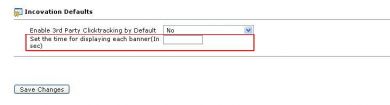
Admin Set Toggling Banners lets one zone show two banners within a single page load, switching between them at an interval the admin sets. Publishers get more from a zone that would otherwise show one banner until the next refresh.
What it does
- Two banners display in the same zone without a page reload, which is aimed at raising publisher revenue from the same space.
- The change interval is set by the admin in seconds, so the pace of switching is under your control.
- A special invocation tag type is provided for the publisher, and the code it generates handles the switching on the page automatically.
How it fits your ad stack
The interval is configured in the Administrator Dashboard configuration section of Revive Adserver, and the toggling itself runs from the generated tag on the publisher's page.
Full feature details
“It’s time to earn more profit by displaying two banners without page load”
The Zone can load only as single banner and the other banner can be loaded only on the next refresh or the Page reload. The toggling banner Module allows the publisher to display two banners in the same zone in a single Page load with the interval set by the Admin.
The plugin for revive ad server Provides a New Invocation tag for the publisher. The admin has option to set the time interval for the banner change in the Administrator Dashboard configuration section.
The code generated by the plugin does the toggling action in the publisher’s page and it changes the banner automatically at Admin set interval.
Features
- The Module provides a special type invocation code for the Publisher.
- The banners will change as per the time interval provided by the admin.
- The time interval can be given in seconds.
- Displaying two banners in the single page load will increase the revenue of publisher.
Frequently Asked Questions
Included with every plugin
- Installation and setup help. We help you install the plugin on your Revive Adserver and confirm that it is working.
- 3 weeks of free support from the day of delivery, covering installation, configuration and any bug in the plugin.
- Your Revive Adserver version. Choose your version in the Product Versions drop-down on this page.
- Licenses to fit your setup. Choose Single Domain, Multi Domain or Source Code in the License drop-down.
Need changes made for your setup? Custom work and consulting are available. Contact us with your requirements.
Common questions
Which Revive Adserver versions does this plugin support?
The supported versions are listed in the Product Versions drop-down on this page. If you run a version that is not listed, contact us before ordering.
What does the free support cover?
For 3 weeks from delivery we help with installation, configuration and any bug in the plugin. Custom development and problems caused by other plugins or your hosting are not part of the free support, but we can quote them separately.
Can you adapt the plugin to my setup?
Yes. Custom work is available. Tell us what you need and we will quote it.